Resource Script (.rc) Or Extensible Markup Language (.XAML)
The other day I was complaining to one of my architects as to why I don't like the look of our application and why it was difficult to work with resource script (.rc) files . I also remembered two parts in this conversation one thing was why resource script inevitably became standard for all our MFC win32 application in our organization and why it was difficult to switch technologies (go to my previous blog where I complained about resolution and other extra testing considerations I missed in the following blog ui-and-localization-important-things)
before we go in detail I want to give some details on how we work in resource script and it's workings and on XAML and ho we can work on things
In a non-localized app, I can use resource files as a repository for app data, particularly for strings that might otherwise be hard-coded in multiple locations in source code. Most commonly, I create resources as either text (.txt) or XML (.resx) files, and use Resgen.exe (Resource File Generator)to compile them into binary .resources files. These files can then be embedded in the app's executable file by a language compiler. For more information about creating resources, (Creating Resource Files for Desktop Apps.)
I can also localize my app's resources for specific cultures. This enables me to build localized (translated) versions of my apps. When I develop an app that uses localized resources, I designate a culture that serves as the neutral or fallback culture whose resources are used if no suitable resources are available. Typically, the resources of the neutral culture are stored in the app's executable. The remaining resources for individual localized cultures are stored in standalone satellite assemblies.( Creating Satellite Assemblies for Desktop Apps).
Carefully determine which resources will make up my app's default resource assembly. Because it is a part of the main assembly, any changes to it will require me to replace the main assembly. If I do not provide a default resource, an exception will be thrown when the resource fallback process attempts to find it. In a well-designed app, using resources should never throw an exception.( Packaging and Deploying Resources in Desktop Apps).
XAML can be used in different platforms such as WPF (Windows Presentation Foundation), Silverlight, Mobile Development, and Windows Store App. It can be used across different .Net framework and CLR (common language runtime) versions.
One can also import Silverlight projects that are created by using a Silverlight template to encode a video project in Microsoft Expression Encoder . Additionally, I can modify the Silverlight templates as well. (Import a Silverlight 1.0 site from Expression Encoder 2 Modify a Silverlight template for Expression Encoder 2 in Expression Blend.)
The class inheritance behavior of WPF XAML elements is a significant departure from a schema-enforced interpretation of XML markup. Class inheritance can become complex, particularly when intermediate base classes are abstract, or when interfaces are involved. This is one reason that the set of XAML elements and their permissible attributes is difficult to represent accurately and completely using the schema types that are typically used for XML programming, such as DTD or XSD format. Another reason is that extensibility and type-mapping features of the XAML language itself preclude completeness of any fixed representation of the permissible types and members.

ForWin32 application
 We have C++ MFC Win32 so with the help of C++\CLI we can call WPF application.
 Thus we can make sure that our new UI works same across all Windows platforms.
 In Windows 8 application
 As we can use Native C++ and XAML to build Windows App
  We can refactor(re-write) the old code in such a way that we retain only business logic and create a new application from it.


before we go in detail I want to give some details on how we work in resource script and it's workings and on XAML and ho we can work on things
The term "resource file" can refer to a number of file types, including:
- The resource script (.rc) file of a program.
- A resource template (.rct) file.
- An individual resource existing as a stand-alone file, such as a bitmap, icon, or cursor file that is referred to from an .rc file.
- A header file generated by the development environment, for example Resource.h, that is referred to from an .rc file.
- Work with nested and conditionally included resource files.
- Update existing resources or convert them to Visual C++ format.
- Import or export graphic resources to or from my current resource file.
- Include shared or read-only identifiers (symbols) that can't be modified by the development environment.
- Include resources in my executable (.exe) file that don't require editing (or that I don't want to be edited) during my current project, such as resources that are shared between several projects.
- Include resource types not supported by the development environment.
Creating and Localizing Resources
In a non-localized app, I can use resource files as a repository for app data, particularly for strings that might otherwise be hard-coded in multiple locations in source code. Most commonly, I create resources as either text (.txt) or XML (.resx) files, and use Resgen.exe (Resource File Generator)to compile them into binary .resources files. These files can then be embedded in the app's executable file by a language compiler. For more information about creating resources, (Creating Resource Files for Desktop Apps.)
I can also localize my app's resources for specific cultures. This enables me to build localized (translated) versions of my apps. When I develop an app that uses localized resources, I designate a culture that serves as the neutral or fallback culture whose resources are used if no suitable resources are available. Typically, the resources of the neutral culture are stored in the app's executable. The remaining resources for individual localized cultures are stored in standalone satellite assemblies.( Creating Satellite Assemblies for Desktop Apps).
Packaging and Deploying Resources
I deploy localized app resources in satellite assemblies. A satellite assembly contains the resources of a single culture; it does not contain any app code. In the satellite assembly deployment model, I create an app with one default assembly (which is typically the main assembly) and one satellite assembly for each culture that the app supports. Because the satellite assemblies are not part of the main assembly, I can easily replace or update resources corresponding to a specific culture without replacing the app's main assembly.Retrieving Resources
At run time, an app loads the appropriate localized resources on a per-thread basis, based on the culture specified by the CultureInfo.CurrentUICulture property.
I can then retrieve resources for the current UI culture or for a specific culture by using the System.Resources.ResourceManager class. Although the ResourceManager class is most commonly used for retrieving resources in desktop apps, the System.Resources namespace contains additional types that I can use to retrieve resources.(see the CultureInfo and CultureInfo.CurrentUICulture):
- The ResourceReader class, which enables me to enumerate resources embedded in an assembly or stored in a standalone binary .resources file. It is useful when I don't know the precise names of the resources that are available at run time.
- The ResXResourceReader class, which enables me to retrieve resources from an XML (.resx) file.
- The ResourceSet class, which enables me to retrieve the resources of a specific culture without observing fallback rules. The resources can be stored in an assembly or a standalone binary .resources file. I can also develop an IResourceReader implementation that enables me to use the ResourceSet class to retrieve resources from some other source.
- The ResXResourceSet class, which enables me to retrieve all the items in an XML resource file into memory.
XAML
Extensible Application Markup Language, or XAML (pronounced "zammel"), is an XML-based markup language developed by Microsoft. XAML is the language behind the visual presentation of an application that you develop in Visual Studio , just as HTML is the language behind the visual presentation of a Web page. Creating an application in Visual Studio means writing XAML code, either by hand or visually by working in the Design view of Visual Studio.- In XAML, it very easy to create, initialize, and set properties of an object with hierarchical relations.
- It is mainly used for designing GUIs.
- It can be used for other purposes as well, e.g., to declare workflow in Workflow Foundation.
XAML is a declarative language in the sense it defines the WHAT and HOW One want to do. XAML processor is responsible for the HOW part to find out. Let's have a look at the following schema. It sums up the XAML side of things
XAML as the equalizer between design applications
One can export art assets from Microsoft Expression Design or XAML editor as XAML, and then import the XAML into one's Visual Studio project. Some other design applications have tools that can convert art assets to XAML. Import XAML that is exported fromOne can also import Silverlight projects that are created by using a Silverlight template to encode a video project in Microsoft Expression Encoder . Additionally, I can modify the Silverlight templates as well. (Import a Silverlight 1.0 site from Expression Encoder 2 Modify a Silverlight template for Expression Encoder 2 in Expression Blend.)
XAML and CLR
XAML is a markup language. The common language runtime (CLR), as implied by its name, enables runtime execution. XAML is not by itself one of the common languages that is directly consumed by the CLR runtime. Instead, One can think of XAML as supporting its own type system. The particular XAML parsing system that is used by WPF is built on the CLR and the CLR type system. XAML types are mapped to CLR types to instantiate a run time representation when the XAML for WPF is parsed. For this reason, the remainder of discussion of syntax in this document will include references to the CLR type system, even though the equivalent syntax discussions in the XAML language specification do not. (Per the XAML language specification level, XAML types could be mapped to any other type system, which does not have to be the CLR, but that would require the creation and use of a different XAML parser.)
 XPS XAML (XML Paper Specification) is the part of WPF XAML that defines an XML representation for formatted electronic documents.
 Silverlight XAML is a subset of WPF XAML that’s intended for browser applications.
WF XAML encompasses the elements that describe Windows Workflow Foundation (WF) content Windows 8 Apps and Windows Phone Apps can be developed with the help of XAML
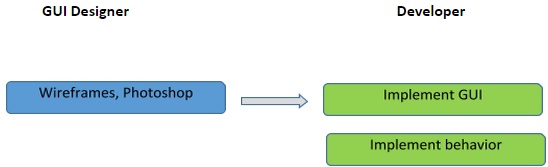
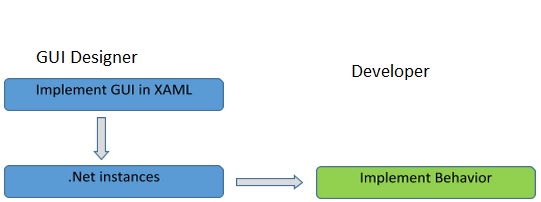
Features
- It can be used to design UI elements in Windows Forms applications.
- Bind to Anything
- Resolution Independence
- Dependency Properties XAML controls could have a hundred properties, easily – especially with attached properties. 100x100 is 10,000 properties. That’s a lot
- Platform Adoption:-All Microsoft Pltforms,
- Some platforms support other UI technologies, but XAML could be used as a common denominator.
- Object Oriented Programming:-Unit testing, inheritance, polymorphism, architectural reuse, and pervasive design patterns are enabled by object oriented languages like C++, C#
- State full:-XAML applications are persistent (state full). It means static methods and properties work. And, it means MVVM works
- XAML is a great UI for augmented technology such as head mount display and screen display because of it’s 3D and Vector Graphics
In the earlier GUI frameworks, there was no real separation between how an application looks like and how it behaves. Both the GUI and its behavior were created in the same language, e.g. C# or VB.net, which would require more effort from the developer to implement both the UI and the behavior associated with it.
With XAML, it is very easy to separate the behavior from the designer code. Hence, the XAML programmer and the designer can work in parallel. XAML codes are very easy to read and understand.
Members of Types and Class Inheritance
Properties and events as they appear as XAML members of a WPF type are often inherited from base type eg:- Background property is not an immediately declared property on the Button class, if I were to look at the class definition, reflection results, or the documentation. Instead, Background is inherited from the base Control class.The class inheritance behavior of WPF XAML elements is a significant departure from a schema-enforced interpretation of XML markup. Class inheritance can become complex, particularly when intermediate base classes are abstract, or when interfaces are involved. This is one reason that the set of XAML elements and their permissible attributes is difficult to represent accurately and completely using the schema types that are typically used for XML programming, such as DTD or XSD format. Another reason is that extensibility and type-mapping features of the XAML language itself preclude completeness of any fixed representation of the permissible types and members.
Attribute Syntax (Properties)
Attribute syntax is the XAML markup syntax that sets a value for a property by declaring an attribute on an existing object element. The attribute name must match the CLR member name of the property of the class that backs the relevant object element.XAML Content Properties
XAML content syntax is a syntax that is only enabled on classes that specify the ContentPropertyAttribute as part of their class declaration. The ContentPropertyAttribute references the property name that is the content property for that type of element (including derived classes). When processed by a XAML processor, any child elements or inner text that are found between the opening and closing tags of the object element will be assigned to be the value of the XAML content property for that object. XAML Content Property Values Must Be Contiguous.
<Page
  xmlns="http://schemas.microsoft.com/winfx/2006/xaml/presentation"
  xmlns:x="http://schemas.microsoft.com/winfx/2006/xaml"
  >
  <StackPanel>
    <Button>Button 1</Button>
    <Button>Button 2</Button>
    <Button>Button 3</Button>
  </StackPanel>
</Page>
XAML Namespaces
None of the preceding syntax examples specified a XAML namespace other than the default XAML namespace. In typical WPF applications, the default XAML namespace is specified to be the WPF namespace. One can specify XAML namespaces other than the default XAML namespace and still use similar syntax.Markup Extensions
XAML defines a markup extension programming entity that enables an escape from the normal XAML processor handling of string attribute values or object elements, and defers the processing to a backing class.
The .NET XAML implementation uses the MarkupExtension abstract class as the basis for all of the markup extensions supported by WPF as well as other frameworks or technologies. For example, a simple WPF data binding is accomplished by specifying the {Binding} markup extension in place of the value that a particular property would ordinarily take.
Attached Properties
Attached properties are a programming concept introduced in XAML whereby properties can be owned and defined by a particular type, but set as attributes or property elements on any element.
Attached Events
Attached events are another programming concept introduced in XAML where events can be defined by a specific type, but handlers may be attached on any object element. In the WOF implementation, often the type that defines an attached event is a static type that defines a service, and sometimes those attached events are exposed by a routed event alias in types that expose the service
Full typeName.memberName Qualified Attributes
The typeName.memberName form for an attribute actually works more universally than just the routed event case. But in other situations that form is superfluous and One should avoid it, if only for reasons of markup style and readability. In the following example, each of the three references to the Background attribute are completely equivalent:<Button Background="Blue">Background</Button> <Button Button.Background="Blue">Button.Background</Button> <Button Control.Background="Blue">Control.Background</Button>
Button.Background works because the qualified lookup for that property on Button is successful (Background was inherited from Control) and Button is the class of the object element or a base class. Control.Background works because the Control class actually defines Background and Control is a Button base class.
XAML as Multiplatform UI
Multi-platform UI Strategy is to implement 3 R's Reduce, Reuse, Recycle

For any new Microsoft platform development to work better we might need XAML.
 As UI is not only Desktop applications or Web-application, Now UI techniques are so advanced that we have interact with touch screen and voice commands.
 Future of UI will involve better rendering to those different screen(small eye gear, wrist watch screen, Big screen) from different inputs.
 There is pressing need that our application render better 2D and 3D content.
 As there are advances in hardware technology there is pressing need to change our UI from just Desktop or Web based application into a multiplatform UI that utilizes such hardware capability(graphic cards and processes).
Multi-platform XAML compatibility
- XAML is NOT a user interface definition language.
- XAML is simply an object instantiation language that happens to be very useful for user interfaces.
- Clearly, it is not possible to simply take something written in XAML and just move it from one environment to another and just expect it to work. For instance, if one was to take a random WPF window defined in XAML and try to run it as part of a Windows Phone application, the experiment is doomed to fail for certain Instead, it is all about class and framework compatibility.
- One shouldn’t ask whether different systems all use XAML, but one should ask whether they use the same classes and whether those classes are compatible and if so to what degree
XAML Multi-Platform Strategy
Only few of XAML components are compatible as shown below this is just one set for Win 8 and Win phone 8

Simple Strategy for Multi-platform UI
A random WPF, Silverlight or Windows Phone application will not “just work” in WinRT by any stretch of the imagination.
However, if I create my original application using best practices and with an explicit eye for reusability and maintainability, I will be able to enjoy a high degree of reuse.
The core idea remains the same as it is for reuse of XAML components across WPF, Silverlight and Silverlight for Windows Phone:
I want to aim for a clear separation between the “mechanics” of the XAML layer (such as the need to use textboxes and to bind them to data) and the “look” of the UI (including both layout as well as cosmetic settings such as colors)
XAML Framework Compatibility

Conclusion:
It is clear that if one is aiming for XAML reuse, one needs to give it some thought. XAML itself does not provide any level of automatic compatibility, but with proper planning, one can create XAML that works in many different environments.


Comments
Post a Comment